Wednesday, August 14, 2013

More stuff for Mari0 +Portal

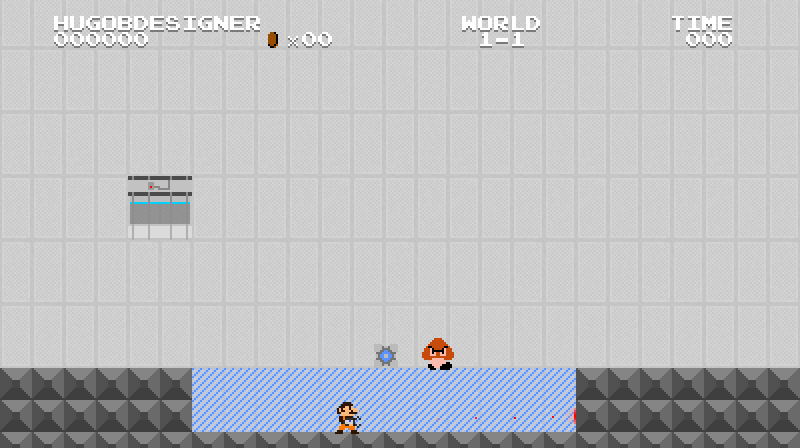
You may be thinking: "Wow, another post so soon after the previous one? That'll probably not going to be so interesting...", but you're wrong! In this meantime, I've added another property (that I've already planned on adding before) and a bug fix/extra-mapping feature/bonus content. The first one: non-player collision blocks. Does this reminds you of something? If you read my blog, then yes:

My old "CubiS" map for Portal. In this map, I tried to introduce (together with many other things that you can read here) the "No Touch" surfaces (non-player collision surfaces). But if you're asking "How can this be used to make puzzles?", then the answer is really simple: use your creativity! In this map, I used this to make impassable gaps. So, since this was only a non-player collision surface, I could put cubes there and pass through the gaps by jumping under them. Now you can do the same with Mari0! Later today (I hope), I'll add, also, the "only-player" collision property. But, let's back to Mari0. To add this property, just put a pixel under the "deadly" one. Also, to make it work better, I highly recommend you adding the "grid" property together to those tiles. You can make them portal-able or not, but, let's be honest: wouldn't it be a lot strange to have a surface that you can't touch but can shoot portals on? Well, I could have removed this feature, but I decided to not to, since I don't know how useful this trick can be.
The second feature I added was the ability to have non-linked cube dispensers to be automatically "on", just like the light bridges does. Even because that'd save time for mappack makers and makes a lot more sense, even because who would put a useless cube dispenser in their mappacks? If so, why having them obligatorily to be linked in order to work, differently from light bridges and lasers? Here's a screenshot of both features:


And I see you in my next post!

POST EDIT:

Actually, it took me around 5-10 minutes to do the "only player collision" property. It's under the "no player" one, and that's what you get:


In my next post I'll try to update my "mod properties" image, so it'll be easier to see how to make you tilesets updated to my mod!

This was a triumph!

So, after a long time trying to figure out how to make "grid" property work on Mari0, I finally found a way, and it was WAAAY easier than I thought. But now we have grid property! Ah, and, also, deadly property!

Lasers, light bridges, gels and portals can pass through...

OK, glowing effects because I was happy, but yeah, grids! Also, to set the "deadly" property, just add a pixel below grid's one. In order to make it work, for now the "deadly" tiles have to have "collision" set, but I'll try to figure out how to make them not requiring this.

Deadly spike tile

But that's all I've got for today. I've made some small bug fixes on the "F1" thing but nothing really special. So, I see you in my next post!

Tuesday, August 13, 2013

When we face dumb problems...

...is when we discover how we need to work better on things. Remember when I posted about coin entities and hammer emancipation fixing? Well, I've been working for some time on a mode that, when you press F1 in-game, the game will show you some data and draw some collisions (for blocks and entities). So, messing around with it, I found this:


See? Instead of deleting hammers, I was just "hiding" them. And if you look at coins, you'll see that they're completely out of place. Also, when we collect the coins, they're not deleted, but just "hidden", as I did with hammers. And, something curious I found today was that coins are colliding with gels (???). Probably because, instead of setting self.mask = {false} to coins, I've set self.mask = {true}, making them collide with any non-collide-able entities (like gels). So, as we all see, I still have a lot of things to do. And I see you in my next post!

Sunday, August 11, 2013

I still should be doing my mod...

Instead, I made another customized clock:

I'm just kidding, of course. I made this one yesterday, since I still had that paper with different sizes of the same clock image. Today I made something you'll REALLY like: multi-customizable coin blocks! If you play Mari0 for some time, you may know that in custom tilesets you can add the property "coinblock" to it (just add a pixel at x = 17 and y = 4 to your tile. The next image shows it better, it's the "Question Mark" pixel)...

(this image shows, also, new properties I'm gonna add to my mod. The bridge one is already included)

But if you do that, all you get is the regular coin block of the game. I've already added the feature that allows you to make custom coin block textures, but, at that time, that was all you could do about coin blocks. But that changes now!


As you see in the image, multi-customizable coin blocks! Ah, and I just recolored them in this image, because I was lazy, but you can change them however you want! The colored blocks are custom coin blocks called "customcoinblock(n).png". You put this texture in your "custom" folder (inside your mappack) and it's done! The (n) is the tile number (and for custom tilesets the first block number is "221") and it has to have the "coinblock" property on it. The first block (in negative, or dark blue, or whatever) is just a regular coin block (in case you have some coin block and don't have a specified texture for it). These ones will use "customcoinblock.png" texture, but if you don't have this texture it'll use the game's original texture. So, go ahead and make your infinite amount of coin blocks! And I see you in my next post...

Saturday, August 10, 2013

I should be working on my mod...

.. but, instead, I'm making a customized clock...


... after this image I made:

But that doesn't means I haven't made anything today. Have you saw stabyourself.net's main page today? It shows a coin feature. Well, it may look like plagiarism, but, even before their post, I was working on coin entities. Coincidence? No. Actually, it's not coincidence because if you look at stabyourself.net's forums, you'll see (if you find) some threads/posts requesting this feature: coins as entities. But mine has an extra feature: it can add as many coins as you want! Well, actually, only up to 10, but I'll change this, and I'll also add more options (like amount of points and signal output when collected). So, if you get one coin, your coin count will increase by the same value specified on the entity's right click menu:


Wednesday, August 7, 2013

Custom levelscreens

Not only that, but also "gameover" and "mappackfinished" screens. You can add a background to it, and change data position (data like coins, points or lives). Here's a non-customized levelscreen:


And a customized one:

And what I used to make the customized:

- A "levelscreen1-1.png" background image:

- A "levelscreen1-1.txt" custom data text:

customname;false;x;y#marioscore;true;317;189#coinanimation;true;327;68#mariocoincount;true;344;68#worldnumber;true;343;148#player1;true;70;64#player2;false;x;y#player3;false;x;y#player4;false;x;y#player1lives;false;x;y#player2lives;false;x;y#player3lives;false;x;y#player4lives;false;x;y

In the end it looks awesome, even if I do say so myself.
But I still wanna add more options (like allow users to show other players even if they're not playing it). But for today it was enough work... So, see you in my next post!

The best solution to a problem...

...is usually the easiest one:

Just added this:


To hammerbro.lua, and it's fixed!

Later today (or tomorrow, I don't know) I'll post more progress of Mari0 +Portal v0.7.